Choose a Mode
Select Photo Animate or Character Swap to define your creation method, whether you want to animate a single character image or replace a character in an existing video.
Video to Video Converter
Reuse motion from a video while changing its character or visual style.
No ideas yet? Try a preset to get started.
Upload an action video and a character image, and our video to video AI generates a new anime-style video where your chosen character mirrors the exact movements of the original clip—smooth, expressive, and ready for social sharing.
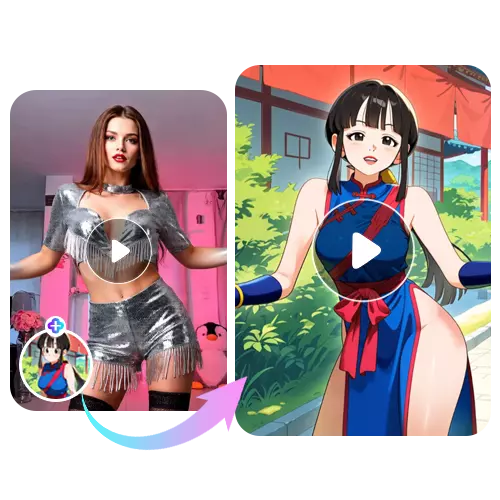
Discover how our video to video AI transforms motion and characters through two flexible creation modes, designed to give creators more control over anime-style video results.
Turn a single character image into a living, animated presence. By combining a performer’s action video with your character photo, this feature recreates natural poses, timing, and movement in a way that feels expressive and intentional. Powered by reference to video AI, it lets your illustrations, OC designs, and anime portraits move with convincing realism—without drawing frames or learning complex animation tools.
Reimagine any video by replacing its character while keeping the original motion and scene untouched. This mode applies the same movements, camera flow, and rhythm to your own character, creating smooth and believable anime-style transformations. With video to video AI, you can explore fan edits, creative variations, and short-form content that feels cohesive—without reshooting or heavy video editing.
Learn how to transform existing footage into a new animated result using video to video, guided by clear steps that focus on motion reuse, character replacement, and fast generation.
Select Photo Animate or Character Swap to define your creation method, whether you want to animate a single character image or replace a character in an existing video.
Upload your own action video or choose one from the template library to provide the motion, timing, and overall movement that will guide the generation.
Upload a character image or select one from templates. The system applies the reference motion while keeping the character’s appearance clear, stable, and consistent.
Choose your output resolution, with 480p and 720p available in the free version, then click Generate to create your final anime-style video.
Discover practical ways creators apply video to video to animate characters, transform styles, and generate anime videos for social media, fan art, and creative storytelling.

Convert illustrations into motion using video to video AI, bringing anime characters to life while preserving original poses and timing.

Apply video style transfer to real footage and easily convert video to anime style, keeping movement while changing the visual look.

Replace characters while keeping original motion through vid to vid workflows, ideal for testing different anime designs in the same scene.

Drive a still character image using a performer clip via reference to video AI, achieving natural, expressive animation without manual rigging.

Enhance scenes with subtle motion changes using an ai video changer, making short anime clips feel more dynamic and engaging.

Create smooth results with an online video to video converter, enabling fast video transformation without complex editing steps.
A video to video AI generator uses artificial intelligence to convert video to video by reusing motion, timing, and structure from an existing clip, while changing characters or visual styles to generate a new animated result.
With an AI video converter, you can create a wide range of content, including character animation, video-to-animation effects, lip-sync–style motion reuse, and video style transfer using artistic filters. These features support versatile applications such as anime creation, social media content, fan art, and experimental video transformation.
Yes. Logged-in users can access video to video free generation with 3 free uses per day. The free quota refreshes automatically the next day, allowing you to keep creating without any upfront cost.
Yes. Videos created with our video to video AI can be used commercially as long as the generated content is meaningfully modified and does not infringe on rights or fully replicate the original source video.
Most videos are generated within a few seconds. If processing takes longer, it is usually due to high demand and queueing for video to video AI free users. Please allow some extra time during peak usage.
Yes. You can select from our built-in anime templates or upload your own images and references to create custom video style transfer results, enabling unique styles and special creative effects.