AI Comic Generator Tutorial: Workflow Guide + Prompt Writing
Summary: Learn how AniFun AI Comic Generators work, control your results with prompts, models, panels, and styles, and avoid common pitfalls in this comprehensive tutorial.
Creating a comic might seem simple at first—just have an idea, click a few buttons, and a finished comic appears. However, using an AI Comic Generator is more complex than it seems. Comics involve more than just combining images and storylines; at the tool level, choices like panel layout, story pacing, style, and prompt design all directly affect the final result. Many first-time users find themselves unsure where to start because of these complexities.
This blog will break down the basics of AI Comic Generator, explaining how to effectively manage prompts, panels, styles, and color choices, helping overcome the challenges at the tool level and making comic creation more efficient and controllable.

AI Comic Generator: What Is It and How It Works
📝What is AI Comic Generator
An AI Comic Generator is a tool that uses artificial intelligence to transform your ideas into comic panels and stories. At its core, it generates visual content based on prompt input.This process typically involves the following steps:
1. Text Input: Users describe their story or provide simple prompts, and the AI interprets them.
2. Smart Adaptation: Based on the input, the AI automatically selects the best-fitting comic panels and dialogue, ensuring the visuals and text match the story.
3. Final Output: The AI combines everything into a cohesive comic page.
AniFun follows this same principle while offering its unique features, like different art styles and controls to refine the comic’s narrative and visual presentation.
⌛How AniFun AI Comic Generator Works
AniFun optimizes the traditional AI comic generator process, making it more efficient and customizable:
1. Simplified Panel and Style Selection: AniFun provides preset style and panel options, so users can select a style, and the AI adapts the entire comic accordingly.
2. Three AI Models: AniFun offers three different AI models, allowing users to choose the best fit for their comic’s style and narrative.
3. One-click Customization: With just a description and style selection, AniFun’s AI generates a complete customized comic page.
How to Control Your AI Comic Results: Four Key Components
✨What is a Prompt and How Does It Affect My Comic?
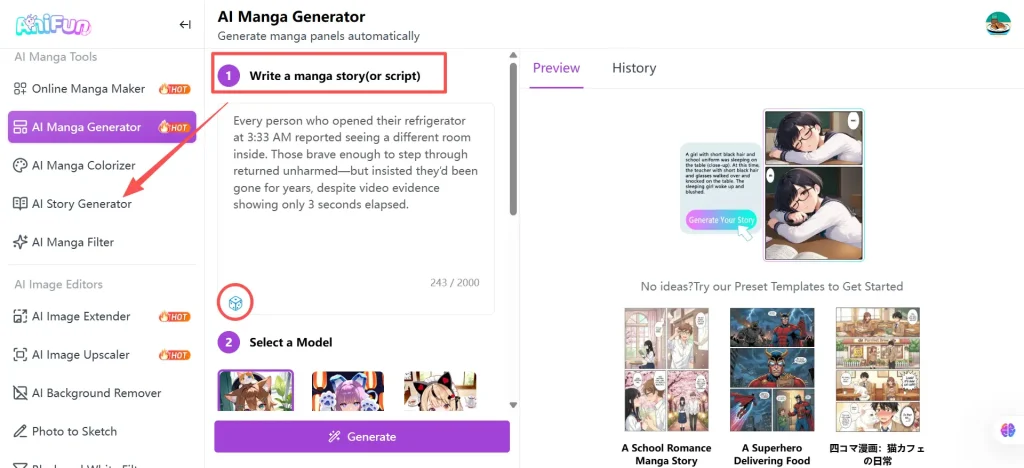
Prompts are the backbone of any AI comic generator—they tell the AI what story to illustrate and guide it in creating panels, dialogue, and visual flow. In other words, the better your prompt, the more coherent and engaging your comic will be.
If you’re just exploring or looking for inspiration, AniFun provides a quick way to experience prompt-based generation: click the dice icon in the lower-left corner to generate a random short comic prompt. This lets you see how the AI interprets and visualizes narrative ideas, making the tool approachable for beginners.
🎯How Do I Choose the Right Models for My Comic?
AniFun offers three different AI models to support different comic creation needs. Among them, the Premium model, powered by the NanoBanana-Pro model, delivers the highest overall quality and is ideal for creators who want the most polished results.
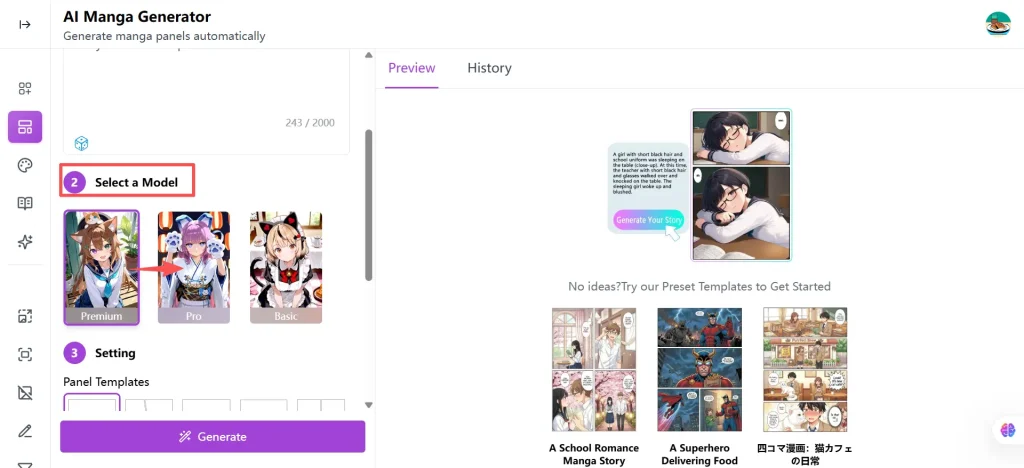
The Premium model excels in several key areas:
● More accurate dialogue understanding: It interprets story context and character emotions more precisely, reducing issues like broken or garbled text in speech bubbles.
● Faithful character rendering: It can closely reproduce established anime-style characters or maintain consistent character appearances across panels.
● Style accuracy: The generated artwork stays much closer to the selected comic style, whether it’s manga, American comics, or other aesthetics.
● Higher visual quality: Panels are more detailed, cleaner, and visually refined, making it especially suitable for important scenes or final showcase pages.
Because the Premium model has a limited number of uses per day, it’s best used for key moments, emotional scenes, or pages where quality matters most.
If Premium usage is exhausted or you need a faster, more flexible option, the Pro model is a strong alternative. It offers stable, high-quality results without daily limits, making it ideal for drafting pages, testing story flow, or generating regular panels.
🖇️How Do Panels Influence the Flow of My Comic?
The way panels are arranged has a direct impact on the pacing and reading experience of your comic. Different panel layouts can make a story feel fast-paced, dramatic, or calm, depending on the scene and narrative intent.
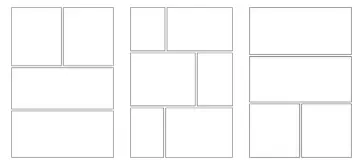
● Fast-paced scenes such as battles or chases work best with Alternating Panels. This layout creates a sense of speed and movement, keeping the reader engaged and emphasizing the action.
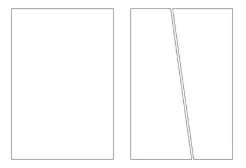
● Major or dramatic moments, like a climactic reveal or key plot twist, benefit from a single or two large panels. This draws attention, increases visual impact, and highlights the significance of the scene.
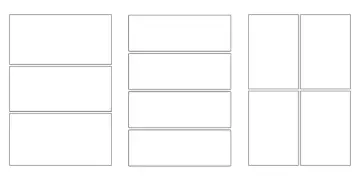
● Slow, emotional conversations or reflective moments are suited for traditional multi-row panels. This layout allows the story to unfold gradually, giving readers time to absorb dialogue and character expressions, resulting in a smooth and immersive narrative flow.
🍁How Do I Choose the Right Style for My Comic?
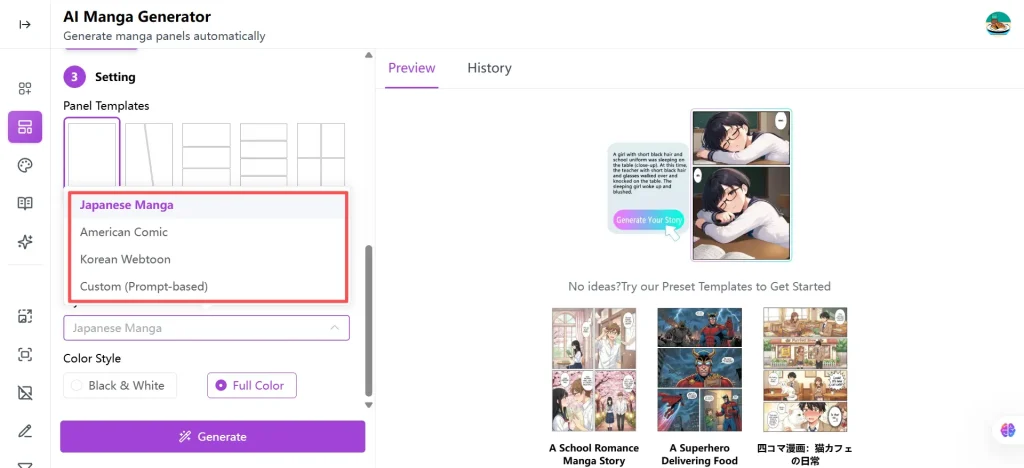
● Japanese (Manga) style is ideal for fast-paced, emotion-rich stories, commonly used in youth, adventure, or coming-of-age narratives. It emphasizes character expressions and dynamic action, making it perfect for emotionally engaging scenes.
● American (Comic) style emphasizes action, strength, and bold visuals, making it well-suited for superhero stories, adventure, or any plot that relies on dramatic motion and visual impact.
● Korean (Webtoon) style works best for long-form, slice-of-life, or romantic stories, often set in modern or urban environments. It provides a smooth narrative flow and focuses on character interactions and gradual story development.
● Custom (Prompt-based) style is ideal for niche or hybrid aesthetics such as cyberpunk, gothic, watercolor illustration, or retro animation, allowing creators to define the visual style directly in the prompt for greater creative flexibility.
When using Custom, make sure to include these style keywords explicitly in your prompt so the AI can accurately apply the desired visual style.
By selecting a style that matches the story’s mood and pacing, creators can guide readers’ emotional experience and ensure the comic’s visual presentation supports the narrative effectively.
How Do I Make the Most of My Panel, Style, and Prompt Choices?
With the right prompts, models, panels, and styles, you can craft a comic that fully matches your creative vision using an AI comic generator from text.
📌Examples
For better comparison, the examples use two split-scene instructions and two non-split-scene instructions.
Prompt:
Panel 1:
Miku, a cute and energetic magical girl with large expressive eyes and long pastel twin pigtails, faces her enemy. She wears a colorful oversized costume with a star-shaped brooch and raises a wand glowing with rainbow energy.
Miku: “I’ll protect everyone with love!”
Panel 2:
Close-up of Miku’s determined face. Her eyes sparkle as she casts a heart-shaped energy blast from her wand. Motion lines, glowing stars, and sparkles fill the panel.
Panel 3:
The fluffy, round monster with big eyes and floppy ears leaps into the air, dodging the attack. Magical sparkles trail around its body as it grins mischievously.
Monster: “You can’t catch me!”
Panel 4:
Wide battle panel showing Miku and the monster mid-action. Heart-shaped explosions, floating stars, and dynamic motion lines create a lively, cute manga-style fight scene.
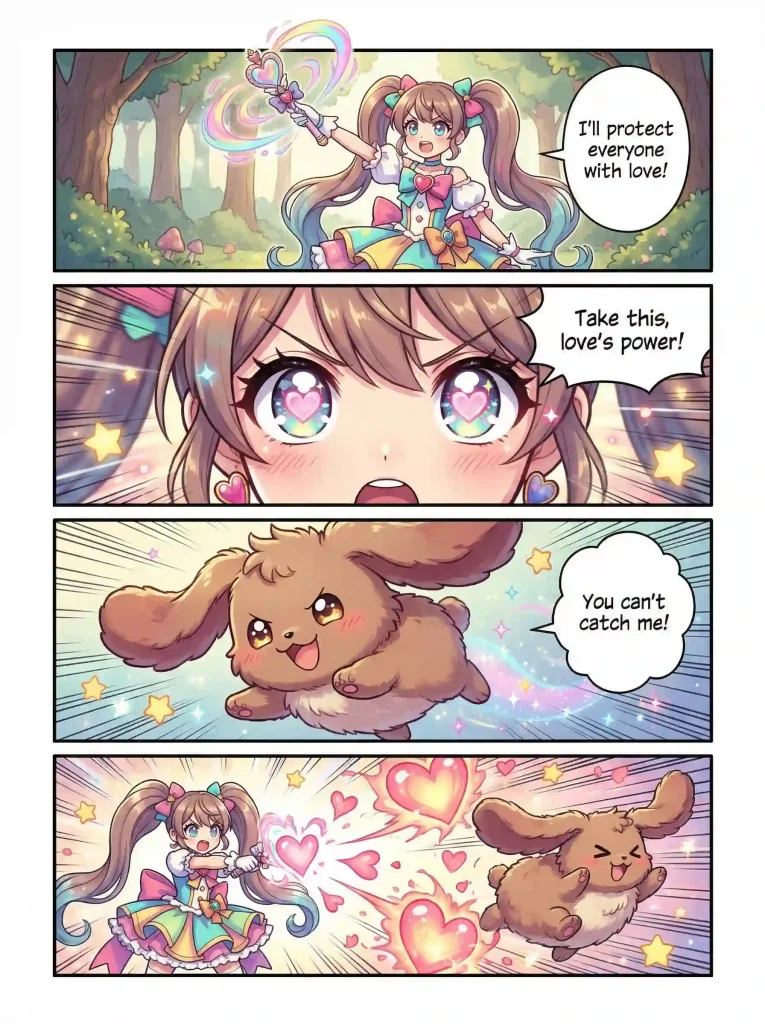
Model: Premium
Panel: 4-panel comic (Yonkoma)
Style: Janpanese Manga
Color: Full Color
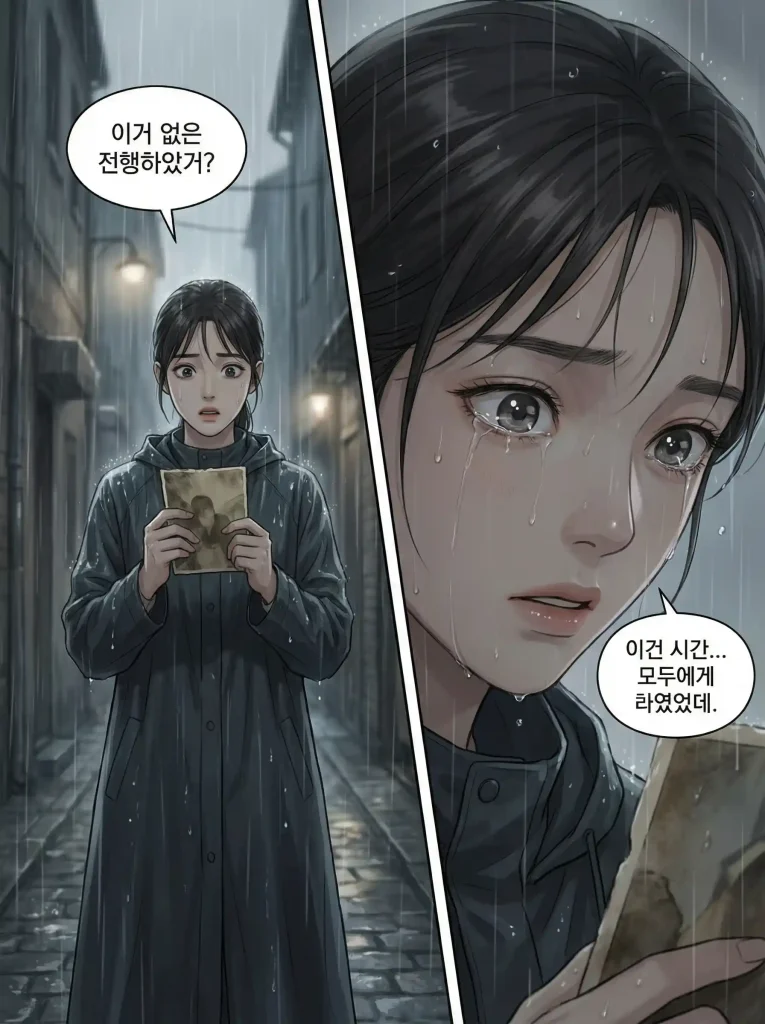
Prompt: Create a Korean webtoon-style comic designed for a major dramatic moment.
Panel 1:
A shocking reveal moment. A young woman stands frozen in the rain, holding an old photograph. Her eyes widen as she realizes the truth. The background fades into soft blur to emphasize her emotional impact and inner turmoil.
Panel 2:
Close-up on her face as a single tear falls. The lighting is quiet and restrained, colors muted and emotional. The atmosphere is heavy and reflective, highlighting this key turning point in the story.
Model: Premium
Panel: 2-panel comic
Style: Korean Webtoon
Color: Full Color
Prompt:
Create an American superhero comic-style page featuring a female hero named Aurora, wearing a sleek blue and silver costume with a flowing cape and metallic armor accents. She has short blonde hair and glowing blue eyes, standing on top of a skyscraper at sunset, overlooking the city skyline. Include dynamic action panels: one showing her leaping off the building with motion lines, another close-up of her clenched fists as she prepares to fight, and a wide-angle shot of the villain causing chaos below. Use bold, thick lines, dramatic shading, and high contrast typical of American comic books. Include speech bubbles: Aurora shouting “I won’t let you escape!” and villain saying “You can’t stop me!” Emphasize energy, movement, and power in poses, with exaggerated anatomy for heroic proportions. Use a rich color palette with warm tones for sunset sky, cool metallic tones for her costume, and fiery effects for explosions or attacks. Panels should vary in shape, include diagonal breaks for dramatic emphasis, and have clear, dynamic layouts guiding the reader’s eye. Add texture and highlights to clothing and environment to enhance realism within the comic style.
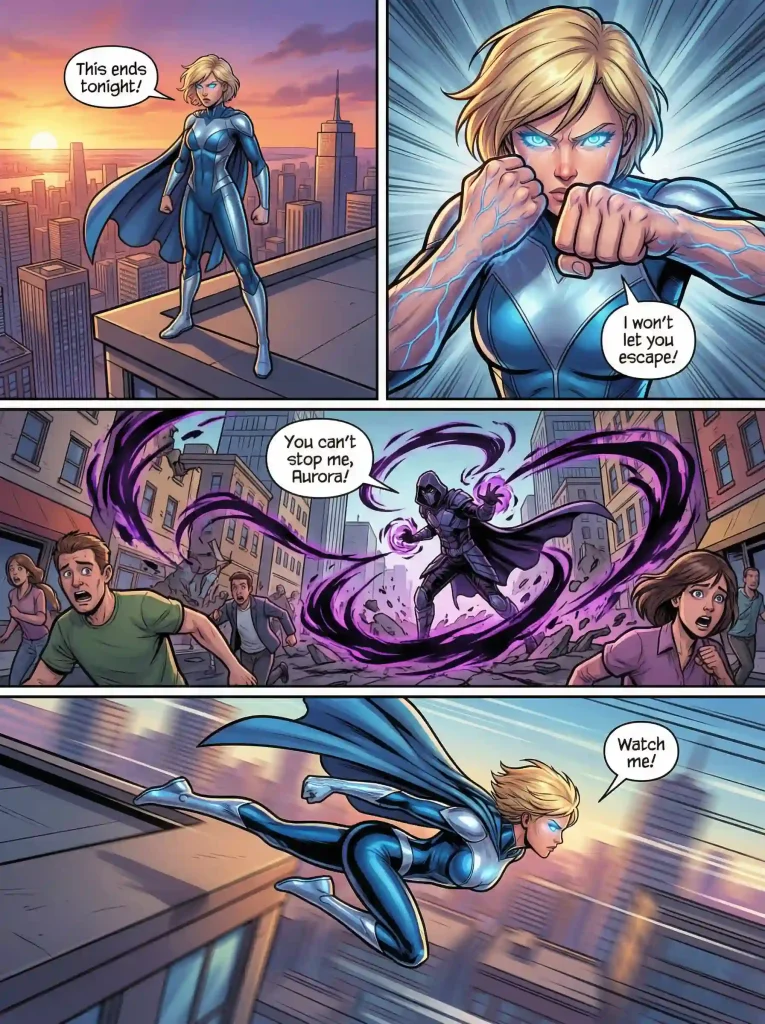
Model: Premium
Panel: 4-panel comic (Alternating Panels)
Style: American Comic Style
Color: Full Color
Prompt:
Generate a cyberpunk comic sequence set in a futuristic floating city. The protagonist, an android mage named Kael, has silver hair, glowing purple eyes, and intricate tattoos across his arms. He wears a long hooded coat with holographic patterns, metallic gloves, and carries a staff emitting magical energy. Include panels showing Kael casting a spell to fend off hovering robotic enemies, with sparks, energy trails, and holographic symbols swirling around him. Use highly detailed linework, sharp angular designs, and dramatic lighting with neon blue, pink, and purple tones. Backgrounds should show floating platforms, airships, and distant glowing towers. Include close-ups of Kael’s determined face, a mid-shot showing spell effects, and a wide panel emphasizing the scale of the city. Use a mix of fantasy and sci-fi textures, intricate machinery, and magical particle effects. Include dialogue boxes: “This city won’t fall while I stand guard!” and ominous robotic sounds “*bzzt* *clank*.” Emphasize cinematic composition, atmospheric depth, and dynamic perspectives, with panels arranged asymmetrically to convey chaos and movement.
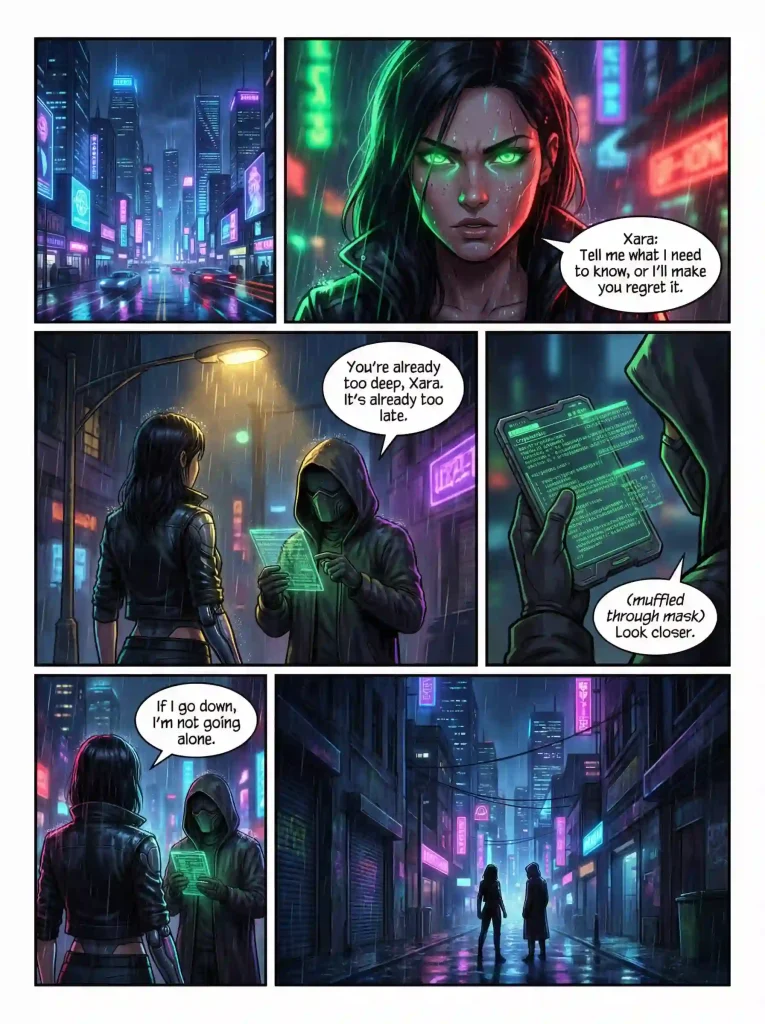
Model: Premium
Panel: Multi-panel (Dramatic panels)
Style: Custom (Prompt-based)
Color: Full Color
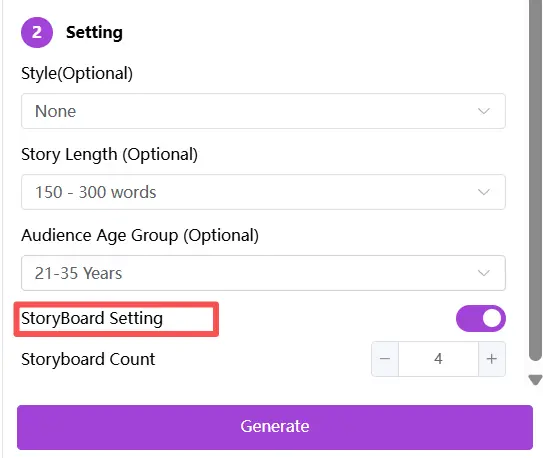
In short, specifying panel layouts helps the AI match your story’s pacing and impact. Without it, AI may split scenes automatically in ways that don’t meet your expectations. If you want your comic to follow a precise flow or specific panel arrangement, it’s recommended to use the approach from the first two types of instructions, where you include explicit panel-by-panel descriptions or generate a storyboard using the AI Story Generator.
Common Misconceptions🤐
❌Misconception 1: “Choosing a style automatically enforces it perfectly.”
Reality: Style selection is not a strong directive. To ensure the desired style appears consistently, it’s often necessary to reinforce the style directly in the prompt.
❌Misconception 2: “AI can fully understand my idea without detailed prompts.”
Reality: AI can only generate content based on the instructions you provide. Vague prompts often lead to inconsistent characters, backgrounds, or even unrelated panels.
❌Misconception 3: “All comics generated by AI will look the same.”
Reality: Even though AI follows certain patterns, the right input can lead to vastly different results based on your choices.
💝Conclusion
Creating comics with AI involves more than just generating images—it requires thoughtful prompt design, careful model selection, appropriate panel layouts, and the right style choice to bring your story to life. Understanding these elements helps you control pacing, emotion, and visual consistency, making your comic creation process smoother and more efficient.
Ready to start your own comic? Try Anifun AI Comic Generator today and explore how easy it is to transform your ideas into engaging, visually stunning comics. Whether you’re a beginner or an experienced creator, experimenting with prompts, panels, models, and styles will help you craft comics that truly capture your vision.
Q1: How long does it take to generate a comic?
It usually takes just a few seconds. Once you enter your prompt, Anifun instantly generates a manga page with layout, artwork, and pacing—ready to download or edit further.
Q2: Can I monetize comic made with Anifun?
Yes—you’re free to use, share, and monetize what you create. All content generated with Anifun is yours. Whether you want to publish it online or print and sell, it’s fully allowed under our terms.
Q3:How does Anifun compare to traditional manga-making?
It’s faster, easier, and more accessible. Traditional manga takes time and drawing skills—Anifun lets anyone generate high-quality manga pages instantly, even with no design experience.
Q4: Can I use my own images in the comic generator?
Currently, AI Comic Generator mainly creates comics from text or prompts and does not support direct image uploads. However, if you want to use your own images, you can use our online manga maker, which allows you to upload images and manually add speech bubbles and text to create fully customized comic pages.